---
title: Adding a Student to a course
description: After creating a course, you can now add students to your course
---
[Skip to content](https://learn.mobiusinstitute.com/mobiusknowledge/adding-a-student-to-a-course#main-content)
English
Show submenu for translations
![Logo-300\_Mobius-Institute-1.png\]](https://learn.mobiusinstitute.com/hs-fs/hubfs/Logo-300_Mobius-Institute-1.png?height=40&name=Logo-300_Mobius-Institute-1.png)
- [www.mobiusinstitute.com](https://www.mobiusinstitute.com/)
- [Contact us](https://learn.mobiusinstitute.com/mobiusknowledge/kb-tickets/new)
- [Sign in](https://learn.mobiusinstitute.com/_hcms/mem/login?redirect_url=/mobiusknowledge/)
Open main navigation
Close main navigation
- [www.mobiusinstitute.com](https://www.mobiusinstitute.com/)
- [Contact us](https://learn.mobiusinstitute.com/mobiusknowledge/kb-tickets/new)
- [Sign in](https://learn.mobiusinstitute.com/_hcms/mem/login?redirect_url=/mobiusknowledge/)
- English
Show submenu for translations
Hello. How can we help you?
- There are no suggestions because the search field is empty.
1. [Knowledge Base](https://learn.mobiusinstitute.com/mobiusknowledge?hsLang=en)
2. [Training Partners](https://learn.mobiusinstitute.com/mobiusknowledge/training-partners?hsLang=en)
3. [TMS (Training Management System)](https://learn.mobiusinstitute.com/mobiusknowledge/training-partners?hsLang=en#tms-training-management-system)
May 25, 2025
# Adding a Student to a course
## After creating a course, you can now add students to your course
From the Training Partner home page, click on the radio button next to the course you would like to add the student to.

Click on at the bottom of the page
Click on  at the bottom of the page
IMPORTANT: Before adding a new student, always check if your student may already exist in our database. Please insert the student email, then click 

If a student is showing with an existing profile, please click on the student and select:
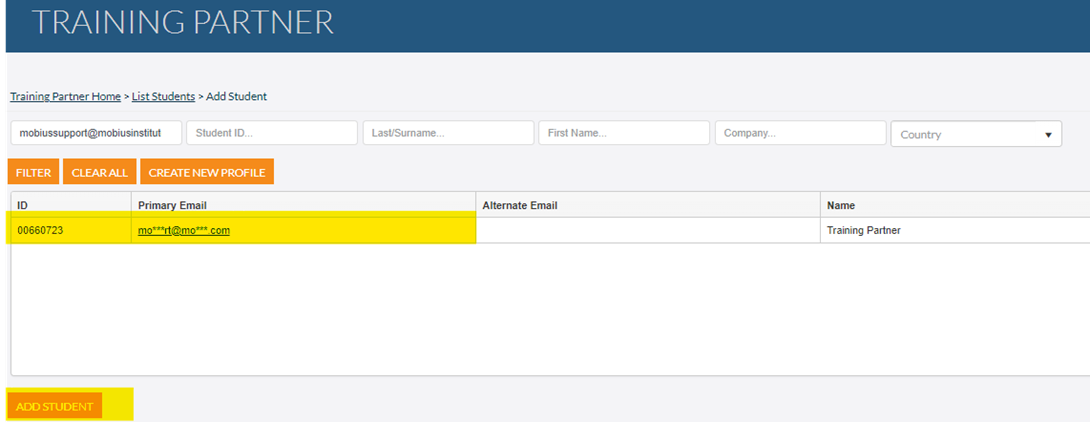
Then tick the boxes next to ‘Attend Training’ and ‘Take Exam’ as highlighted in yellow to register the student for both the course and exam. (For those students that only wish to attend the course, you would only tick ‘Attend Training’).
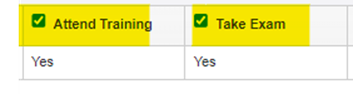
To finalise the student registration, please select 
If you do not find an existing student profile for the student you wish to enter, please insert the email, year of birth, Last name and First name and select 
You can then procced with ticking the boxes next to ‘Attend Training’ and ‘Take Exam’ as highlighted in yellow to register the student for both the course and exam (if applicable).
To finalise the registration, please select 
You can continue to search and add students. Once you have finished, click the button  to return to the Training Partner homepage.
- [Training Partners](https://learn.mobiusinstitute.com/mobiusknowledge/training-partners?hsLang=en#main-content)
- [Training](https://learn.mobiusinstitute.com/mobiusknowledge/training-partners?hsLang=en#training)
- [Exams](https://learn.mobiusinstitute.com/mobiusknowledge/training-partners?hsLang=en#exams)
- [Certification](https://learn.mobiusinstitute.com/mobiusknowledge/training-partners?hsLang=en#certification)
- [Renewals](https://learn.mobiusinstitute.com/mobiusknowledge/training-partners?hsLang=en#renewals)
- [Policy Documents & Forms](https://learn.mobiusinstitute.com/mobiusknowledge/training-partners?hsLang=en#policy-documents-forms)
- [FAQ](https://learn.mobiusinstitute.com/mobiusknowledge/training-partners?hsLang=en#faq)
- [TMS (Training Management System)](https://learn.mobiusinstitute.com/mobiusknowledge/training-partners?hsLang=en#tms-training-management-system)
- [Students](https://learn.mobiusinstitute.com/mobiusknowledge/students?hsLang=en#main-content)
- [Training](https://learn.mobiusinstitute.com/mobiusknowledge/students?hsLang=en#training)
- [Exams](https://learn.mobiusinstitute.com/mobiusknowledge/students?hsLang=en#exams)
- [Renewals](https://learn.mobiusinstitute.com/mobiusknowledge/students?hsLang=en#renewals)
- [FAQ](https://learn.mobiusinstitute.com/mobiusknowledge/students?hsLang=en#faq)
- [Invigilators](https://learn.mobiusinstitute.com/mobiusknowledge/invigilators?hsLang=en#main-content)
- [Exams](https://learn.mobiusinstitute.com/mobiusknowledge/invigilators?hsLang=en#exams)
- [www.mobiusinstitute.com](https://www.mobiusinstitute.com/)
- [Contact us](https://learn.mobiusinstitute.com/mobiusknowledge/kb-tickets/new)
- [Sign in](https://learn.mobiusinstitute.com/_hcms/mem/login?redirect_url=/mobiusknowledge/)
[](http://www.mobiusinstitute.com)
mobiusinstitute.com Help Center
Copyright © 2025, Mobius Institute