---
title: Removing a student from a course
description: Removing a student from a course
---
[Skip to content](https://learn.mobiusinstitute.com/mobiusknowledge/removing-a-student-from-a-course#main-content)
English
Show submenu for translations
![Logo-300\_Mobius-Institute-1.png\]](https://learn.mobiusinstitute.com/hs-fs/hubfs/Logo-300_Mobius-Institute-1.png?height=40&name=Logo-300_Mobius-Institute-1.png)
- [www.mobiusinstitute.com](https://www.mobiusinstitute.com/)
- [Contact us](https://learn.mobiusinstitute.com/mobiusknowledge/kb-tickets/new)
- [Sign in](https://learn.mobiusinstitute.com/_hcms/mem/login?redirect_url=/mobiusknowledge/)
Open main navigation
Close main navigation
- [www.mobiusinstitute.com](https://www.mobiusinstitute.com/)
- [Contact us](https://learn.mobiusinstitute.com/mobiusknowledge/kb-tickets/new)
- [Sign in](https://learn.mobiusinstitute.com/_hcms/mem/login?redirect_url=/mobiusknowledge/)
- English
Show submenu for translations
Hello. How can we help you?
- There are no suggestions because the search field is empty.
1. [Knowledge Base](https://learn.mobiusinstitute.com/mobiusknowledge?hsLang=en)
2. [Training Partners](https://learn.mobiusinstitute.com/mobiusknowledge/training-partners?hsLang=en)
3. [TMS (Training Management System)](https://learn.mobiusinstitute.com/mobiusknowledge/training-partners?hsLang=en#tms-training-management-system)
August 20, 2026
# Removing a student from a course
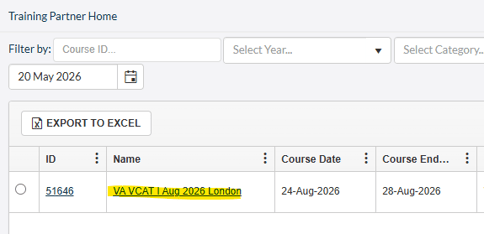
Select the course from the TP Admin homepage by clicking on the name of the course.
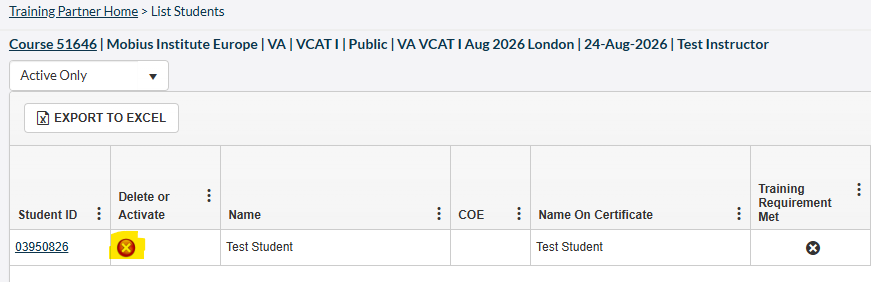
Click on the  next to the student you wish to remove.
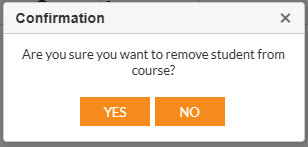
Click YES when the system asks you to confirm that you want to remove the student.
- [Training Partners](https://learn.mobiusinstitute.com/mobiusknowledge/training-partners?hsLang=en#main-content)
- [Training](https://learn.mobiusinstitute.com/mobiusknowledge/training-partners?hsLang=en#training)
- [Exams](https://learn.mobiusinstitute.com/mobiusknowledge/training-partners?hsLang=en#exams)
- [Certification](https://learn.mobiusinstitute.com/mobiusknowledge/training-partners?hsLang=en#certification)
- [Renewals](https://learn.mobiusinstitute.com/mobiusknowledge/training-partners?hsLang=en#renewals)
- [Policy Documents & Forms](https://learn.mobiusinstitute.com/mobiusknowledge/training-partners?hsLang=en#policy-documents-forms)
- [FAQ](https://learn.mobiusinstitute.com/mobiusknowledge/training-partners?hsLang=en#faq)
- [TMS (Training Management System)](https://learn.mobiusinstitute.com/mobiusknowledge/training-partners?hsLang=en#tms-training-management-system)
- [Students](https://learn.mobiusinstitute.com/mobiusknowledge/students?hsLang=en#main-content)
- [Training](https://learn.mobiusinstitute.com/mobiusknowledge/students?hsLang=en#training)
- [Exams](https://learn.mobiusinstitute.com/mobiusknowledge/students?hsLang=en#exams)
- [Renewals](https://learn.mobiusinstitute.com/mobiusknowledge/students?hsLang=en#renewals)
- [FAQ](https://learn.mobiusinstitute.com/mobiusknowledge/students?hsLang=en#faq)
- [Invigilators](https://learn.mobiusinstitute.com/mobiusknowledge/invigilators?hsLang=en#main-content)
- [Exams](https://learn.mobiusinstitute.com/mobiusknowledge/invigilators?hsLang=en#exams)
- [www.mobiusinstitute.com](https://www.mobiusinstitute.com/)
- [Contact us](https://learn.mobiusinstitute.com/mobiusknowledge/kb-tickets/new)
- [Sign in](https://learn.mobiusinstitute.com/_hcms/mem/login?redirect_url=/mobiusknowledge/)
[](http://www.mobiusinstitute.com)
mobiusinstitute.com Help Center
Copyright © 2025, Mobius Institute