---
title: Exam Re-sits
description: The TMS has been updated to include an Exam Re-sit option which supports the new discounted pricing for Exam Re-sits.
---
[Skip to content](https://learn.mobiusinstitute.com/mobiusknowledge/exam-re-sits#main-content)
English
Show submenu for translations
![Logo-300\_Mobius-Institute-1.png\]](https://learn.mobiusinstitute.com/hs-fs/hubfs/Logo-300_Mobius-Institute-1.png?height=40&name=Logo-300_Mobius-Institute-1.png)
- [www.mobiusinstitute.com](https://www.mobiusinstitute.com/)
- [Contact us](https://learn.mobiusinstitute.com/mobiusknowledge/kb-tickets/new)
- [Sign in](https://learn.mobiusinstitute.com/_hcms/mem/login?redirect_url=/mobiusknowledge/)
Open main navigation
Close main navigation
- [www.mobiusinstitute.com](https://www.mobiusinstitute.com/)
- [Contact us](https://learn.mobiusinstitute.com/mobiusknowledge/kb-tickets/new)
- [Sign in](https://learn.mobiusinstitute.com/_hcms/mem/login?redirect_url=/mobiusknowledge/)
- English
Show submenu for translations
Hello. How can we help you?
- There are no suggestions because the search field is empty.
1. [Knowledge Base](https://learn.mobiusinstitute.com/mobiusknowledge?hsLang=en)
2. [Training Partners](https://learn.mobiusinstitute.com/mobiusknowledge/training-partners?hsLang=en)
3. [Exams](https://learn.mobiusinstitute.com/mobiusknowledge/training-partners?hsLang=en#exams)
August 20, 2026
# Exam Re-sits
To order an **Exam Re-sit** for a student, create a new course in the TMS using the usual new course creation process. In the "Delivery" field, choose "**Exam Only**". In the Instructor field, choose "**Exam Only Invigilator**".
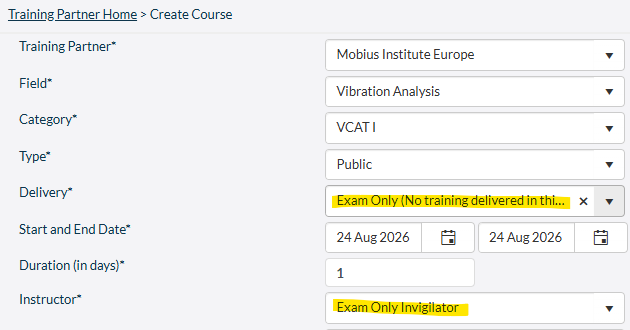
The TMS has been updated to include an **Exam Re-sit** option which supports the new discounted pricing for Exam Re-sits.
Ensuring you select the **Exam Re-sit** option, when required, is important to ensure invoices are generated correctly.
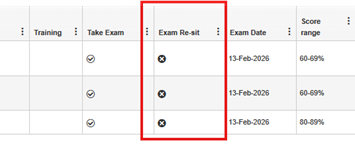
When enrolling a student in a scheduled course or exam-only course, you must select take exam and **Exam Re-sit** for a student who is only retaking an exam.
When choosing **Exam Re-sit**, the student will not receive a registration email from the TMS.

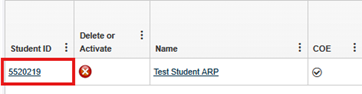
If the **Exam Re-sit** option was not selected when you added the student to the course, you can edit the student record by selecting the Student ID link in the course and choosing **Exam Re-sit** as shown below.

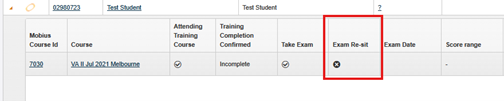
Course details in the TMS will clearly indicate when a student is retaking an exam. This information will also be visible when searching for a student.
Once you have completed this process, please use the MIBoC online exam order form under **TOOLS \> ORDERS \> ORDER ONLINE EXAMS** to submit the exam session details for setup.
**MIBoC** allows a student to take the exam for a specific technology **3** times with **30-days** between each attempt. If the student is unsuccessful on the **third** attempt they must wait **12 months** (365 days) before they can re-sit the exam.
- [Training Partners](https://learn.mobiusinstitute.com/mobiusknowledge/training-partners?hsLang=en#main-content)
- [Training](https://learn.mobiusinstitute.com/mobiusknowledge/training-partners?hsLang=en#training)
- [Exams](https://learn.mobiusinstitute.com/mobiusknowledge/training-partners?hsLang=en#exams)
- [Certification](https://learn.mobiusinstitute.com/mobiusknowledge/training-partners?hsLang=en#certification)
- [Renewals](https://learn.mobiusinstitute.com/mobiusknowledge/training-partners?hsLang=en#renewals)
- [Policy Documents & Forms](https://learn.mobiusinstitute.com/mobiusknowledge/training-partners?hsLang=en#policy-documents-forms)
- [FAQ](https://learn.mobiusinstitute.com/mobiusknowledge/training-partners?hsLang=en#faq)
- [TMS (Training Management System)](https://learn.mobiusinstitute.com/mobiusknowledge/training-partners?hsLang=en#tms-training-management-system)
- [Students](https://learn.mobiusinstitute.com/mobiusknowledge/students?hsLang=en#main-content)
- [Training](https://learn.mobiusinstitute.com/mobiusknowledge/students?hsLang=en#training)
- [Exams](https://learn.mobiusinstitute.com/mobiusknowledge/students?hsLang=en#exams)
- [Renewals](https://learn.mobiusinstitute.com/mobiusknowledge/students?hsLang=en#renewals)
- [FAQ](https://learn.mobiusinstitute.com/mobiusknowledge/students?hsLang=en#faq)
- [Invigilators](https://learn.mobiusinstitute.com/mobiusknowledge/invigilators?hsLang=en#main-content)
- [Exams](https://learn.mobiusinstitute.com/mobiusknowledge/invigilators?hsLang=en#exams)
- [www.mobiusinstitute.com](https://www.mobiusinstitute.com/)
- [Contact us](https://learn.mobiusinstitute.com/mobiusknowledge/kb-tickets/new)
- [Sign in](https://learn.mobiusinstitute.com/_hcms/mem/login?redirect_url=/mobiusknowledge/)
[](http://www.mobiusinstitute.com)
mobiusinstitute.com Help Center
Copyright © 2025, Mobius Institute